Yep, we may get a tiny thank-you (read: commission) when you buy through links on Autologr — not enough for a yacht, but enough to keep the lights (and servers) on. Learn more
Need the real scoop on the Toguard CE35? See why drivers prefer it after reviewing all 140 specs & performance — especially the storage media type, front camera resolution, rear camera resolution & display size.
A fast snapshot of the Toguard CE35, covering its standout specification and what you can expect right out of the box.
Toguard CE35
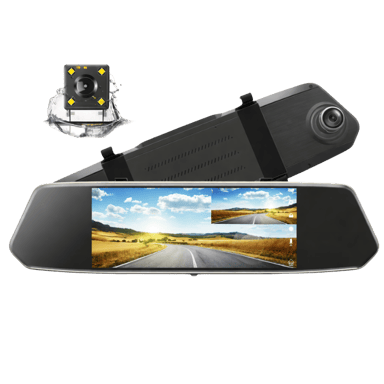
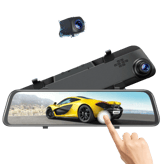
Toguard CE35 is a mirror-style dual dash cam that records both front and rear views at the same time. It features a touchscreen display integrated into the rear-view mirror, making it easy to use while driving. With basic safety features like loop recording and parking monitoring, it is suitable for everyday driving and general road coverage.
Quick Specs Breakdown
The key specs that actually matter—no fluff, no guesswork
Here’s a streamlined view of the Toguard CE35 key specifications. Compare critical features at a glance before exploring the full specs and hands-on insights below.
General Information
Storage Media Type
What storage media does it use?
microSD
Device Type
What type of device is this?
Dash Cam
Video & Recording Performance
Front Camera Resolution
What is the front camera resolution?
1080p
Rear Camera Resolution
What is the rear camera resolution?
720p
Night Vision Mode
Does it have night vision?
Yes
Display & Interface
Display Size
What is the display size?
7 inch
Display Type
What type of display does it use?
IPS
Touchscreen
Is the display touchscreen-enabled?
Yes
Safety, Security & Parking Protection
Collision Detection
Does it detect collisions?
Yes
Power, Battery & Charging
Charging While Recording
Can it charge while recording?
Yes
Internal Battery Capacity
What is the internal battery capacity?
150-300 mAh
Build, Dimensions & Mounting
Main Unit Width
What is the main unit width?
10 inch
Specifications & Facts 140
Specs measured. Drama avoided.
Is the Toguard CE35 the best choice in its class? You’ll find out here with full specs, comparisons to similar dash cams, and opinions from the community.
Dash Cam in this range Who knows? (Help us out by suggesting one!)
Toguard CE35
Night vision mode is enabled, enhancing visibility and recording quality in low-light or nighttime conditions.
Enables improved recording in low-light conditions.
Don’t keep it to yourself — be the first to react and review the Night Vision Mode on Toguard CE35 ◉ and help others decide!
Toguard CE35 Front Frame Rate
What is the front camera frame rate?
30 Hz 0Votes
Dash Cam in this range Who knows? (Help us out by suggesting one!)
Toguard CE35
The front camera captures video at a frame rate of 30 Hz, standard for smooth and reliable footage quality.
Measures how smoothly the front camera records motion.
Don’t keep it to yourself — be the first to react and review the Front Frame Rate on Toguard CE35 ◉ and help others decide!
Toguard CE35 Rear Frame Rate
What is the rear camera frame rate?
30 Hz 0Votes
Dash Cam in this range Who knows? (Help us out by suggesting one!)
Toguard CE35
The rear camera records video at 30 Hz, which is standard for smooth motion capture in dash cams.
Indicates the rear camera’s recording smoothness.
Don’t keep it to yourself — be the first to react and review the Rear Frame Rate on Toguard CE35 ◉ and help others decide!
Toguard CE35 Video Codec
What video codec is used?
0 Toguard CE35 0 Votes H.264
Dash Cam in this range Who knows? (Help us out by suggesting one!)
Toguard CE35
The video codec used is H.264, a popular format that efficiently compresses video files without sacrificing quality.
Defines the compression format used for video files.
Don’t keep it to yourself — be the first to react and review the Video Codec on Toguard CE35 ◉ and help others decide!
Toguard CE35 Loop Recording
Does it support loop recording?
Yes 0Votes Toguard CE35
Dash Cam in this range Who knows? (Help us out by suggesting one!)
Toguard CE35
Loop recording continuously records over old footage, allowing for uninterrupted use without manual file management.
Automatically overwrites old footage when storage is full.
Don’t keep it to yourself — be the first to react and review the Loop Recording on Toguard CE35 ◉ and help others decide!
Toguard CE35 Parking Recording Mode
Does it record while parked?
Yes 0Votes Toguard CE35
Dash Cam in this range Who knows? (Help us out by suggesting one!)
Toguard CE35
Parking recording mode is supported to monitor the vehicle when parked, helping detect incidents or vandalism.
Enables recording while the vehicle is parked.
Don’t keep it to yourself — be the first to react and review the Parking Recording Mode on Toguard CE35 ◉ and help others decide!
Toguard CE35 Video Bitrate
What is the video bitrate?
0 Toguard CE35 0 Votes 12-16 Mbps
Dash Cam in this range Who knows? (Help us out by suggesting one!)
Toguard CE35
The video bitrate ranges from 12 to 16 Mbps, balancing video quality and file size for efficient storage.
Describes the data rate used for video encoding quality.
Don’t keep it to yourself — be the first to react and review the Video Bitrate on Toguard CE35 ◉ and help others decide!
Toguard CE35 WDR
Does it support WDR?
Yes 0Votes Toguard CE35
Dash Cam in this range Who knows? (Help us out by suggesting one!)
Toguard CE35
WDR (Wide Dynamic Range) technology is enabled, which helps balance lighting in scenes for clearer images in high-contrast conditions.
Enhances visibility in mixed lighting conditions.
Don’t keep it to yourself — be the first to react and review the WDR on Toguard CE35 ◉ and help others decide!
Toguard CE35 Low-Light Enhancement
Is low-light enhanced?
Yes 0Votes Toguard CE35
Dash Cam in this range Who knows? (Help us out by suggesting one!)
Toguard CE35
Low-light enhancement improves video clarity and detail in poor lighting conditions, enhancing the usefulness of recorded footage at night or in shadows.
Improves video clarity in dark environments.
Don’t keep it to yourself — be the first to react and review the Low-Light Enhancement on Toguard CE35 ◉ and help others decide!
Toguard CE35 Emergency Recording
Is emergency recording supported?
Yes 0Votes Toguard CE35
Dash Cam in this range Who knows? (Help us out by suggesting one!)
Toguard CE35
Emergency recording functionality ensures that in sudden or critical events, recording is automatically triggered and saved securely.
Locks footage during detected incidents.
Don’t keep it to yourself — be the first to react and review the Emergency Recording on Toguard CE35 ◉ and help others decide!
Toguard CE35 Continuous Recording
Can it record continuously?
Yes 0Votes Toguard CE35
Dash Cam in this range Who knows? (Help us out by suggesting one!)
Toguard CE35
Continuous recording is supported, ensuring uninterrupted video capture by automatically overwriting old footage when the memory is full.
Indicates support for uninterrupted recording sessions.
Don’t keep it to yourself — be the first to react and review the Continuous Recording on Toguard CE35 ◉ and help others decide!
Toguard CE35 Dual Recording
Does it support dual recording?
Yes 0Votes Toguard CE35
Dash Cam in this range Who knows? (Help us out by suggesting one!)
Toguard CE35
Dual recording mode enables simultaneous capture from front and rear cameras, increasing overall scene coverage for safety and review.
Allows simultaneous front and rear recording.
Don’t keep it to yourself — be the first to react and review the Dual Recording on Toguard CE35 ◉ and help others decide!
Toguard CE35 Audio Recording
Does it record audio?
Yes 0Votes Toguard CE35
Dash Cam in this range Who knows? (Help us out by suggesting one!)
Toguard CE35
Audio recording feature is enabled, capturing sound along with video which can provide important context in recordings.
Captures in-cabin audio alongside video.
Don’t keep it to yourself — be the first to react and review the Audio Recording on Toguard CE35 ◉ and help others decide!
Toguard CE35 Audio Recording Disable Option
Can audio recording be disabled?
Yes 0Votes Toguard CE35
Dash Cam in this range Who knows? (Help us out by suggesting one!)
Toguard CE35
Audio recording can be disabled, allowing users to respect privacy or avoid recording sound during journeys.
Allows users to turn off audio recording.
Don’t keep it to yourself — be the first to react and review the Audio Recording Disable Option on Toguard CE35 ◉ and help others decide!
Toguard CE35 HDR
Does it support HDR?
No 0Votes Toguard CE35
Dash Cam in this range Who knows? (Help us out by suggesting one!)
Indicates support for High Dynamic Range video.
Don’t keep it to yourself — be the first to react and review the HDR on Toguard CE35 ◉ and help others decide!
Toguard CE35 Infrared Night Vision
Does it support infrared night vision?
No 0Votes Toguard CE35
Dash Cam in this range Who knows? (Help us out by suggesting one!)
Uses infrared LEDs for interior or low-light recording.
Don’t keep it to yourself — be the first to react and review the Infrared Night Vision on Toguard CE35 ◉ and help others decide!
Toguard CE35 Event Video Length
How long are event recordings?
0 Toguard CE35 0 Votes 30-60 Seconds
Dash Cam in this range Who knows? (Help us out by suggesting one!)
Defines the duration of automatically saved event recordings.
Don’t keep it to yourself — be the first to react and review the Event Video Length on Toguard CE35 ◉ and help others decide!
Toguard CE35 Triple Channel Recording
Does it support triple recording?
No 0Votes Toguard CE35
Dash Cam in this range Who knows? (Help us out by suggesting one!)
Supports front, rear, and interior recording together.
Don’t keep it to yourself — be the first to react and review the Triple Channel Recording on Toguard CE35 ◉ and help others decide!
Toguard CE35 Time-Lapse Recording
Is time-lapse recording available?
No 0Votes Toguard CE35
Dash Cam in this range Who knows? (Help us out by suggesting one!)
Captures frames at intervals to save storage.
Don’t keep it to yourself — be the first to react and review the Time-Lapse Recording on Toguard CE35 ◉ and help others decide!
Toguard CE35 Recording Delay After Ignition
How long does recording continue after ignition off?
0 Toguard CE35 0 Votes 1-3 Seconds
Dash Cam in this range Who knows? (Help us out by suggesting one!)
Specifies how long recording continues after the engine is turned off.
Don’t keep it to yourself — be the first to react and review the Recording Delay After Ignition on Toguard CE35 ◉ and help others decide!
Camera & Lens System 12
Toguard CE35 Front Lens Field of View
What is the front lens field of view?
170 degree 0Votes
Dash Cam in this range Who knows? (Help us out by suggesting one!)
Toguard CE35
The front lens field of view is 170 degrees, providing a wide perspective to capture more of the driving environment.
Indicates how wide the front camera can capture the road.
Don’t keep it to yourself — be the first to react and review the Front Lens Field of View on Toguard CE35 ◉ and help others decide!
Toguard CE35 Rear Lens Field of View
What is the rear lens field of view?
140 degree 0Votes
Dash Cam in this range Who knows? (Help us out by suggesting one!)
Toguard CE35
The rear lens has a field of view of 140 degrees, wide enough to capture a broad area behind the vehicle, improving safety and recording comprehensiveness.
Defines the viewing angle of the rear-facing lens.
Don’t keep it to yourself — be the first to react and review the Rear Lens Field of View on Toguard CE35 ◉ and help others decide!
Toguard CE35 Lens Aperture
What is the lens aperture?
0 Toguard CE35 0 Votes f/2.0
Dash Cam in this range Who knows? (Help us out by suggesting one!)
Toguard CE35
The lens aperture is f/2.0, which allows a decent amount of light to enter, helping to capture clearer images especially in lower light.
Describes the lens opening size affecting low-light performance.
Don’t keep it to yourself — be the first to react and review the Lens Aperture on Toguard CE35 ◉ and help others decide!
Toguard CE35 Lens Element Count
How many lens elements are used?
0 Toguard CE35 0 Votes 4-layer
Dash Cam in this range Who knows? (Help us out by suggesting one!)
Toguard CE35
The lens consists of 4 layers, which can improve image clarity and reduce distortions compared to simpler lens designs.
Indicates how many glass elements make up the lens.
Don’t keep it to yourself — be the first to react and review the Lens Element Count on Toguard CE35 ◉ and help others decide!
Toguard CE35 Lens Type
What type of lens is used?
0 Toguard CE35 0 Votes Glass
Dash Cam in this range Who knows? (Help us out by suggesting one!)
Toguard CE35
The lens material is glass, which typically offers superior optical clarity and durability compared to plastic lenses.
Specifies the material and construction of the lens.
Don’t keep it to yourself — be the first to react and review the Lens Type on Toguard CE35 ◉ and help others decide!
Toguard CE35 Adjustable Lens Angle
Is the lens angle adjustable?
Yes 0Votes Toguard CE35
Dash Cam in this range Who knows? (Help us out by suggesting one!)
Toguard CE35
The lens angle is adjustable, which allows customizing the camera's view to better fit the specific vehicle and mounting position.
Indicates whether the lens angle can be manually adjusted.
Don’t keep it to yourself — be the first to react and review the Adjustable Lens Angle on Toguard CE35 ◉ and help others decide!
Toguard CE35 Focus Type
What focus type does it use?
0 Toguard CE35 0 Votes Fixed
Dash Cam in this range Who knows? (Help us out by suggesting one!)
Toguard CE35
The camera lens has a fixed focus type, meaning it is preset to focus at a specific range without the need for manual adjustment.
Describes how the camera focuses on objects.
Don’t keep it to yourself — be the first to react and review the Focus Type on Toguard CE35 ◉ and help others decide!
Toguard CE35 Anti-Glare Coating
Does it have anti-glare coating?
Yes 0Votes Toguard CE35
Dash Cam in this range Who knows? (Help us out by suggesting one!)
Toguard CE35
An anti-glare coating is applied to reduce reflections and improve visibility of the display in bright conditions.
Minimizes reflections and glare on the lens surface.
Don’t keep it to yourself — be the first to react and review the Anti-Glare Coating on Toguard CE35 ◉ and help others decide!
Toguard CE35 Sensor Type
What sensor type is used?
0 Toguard CE35 0 Votes CMOS
Dash Cam in this range Who knows? (Help us out by suggesting one!)
Toguard CE35
The sensor type is CMOS, a standard imaging sensor technology known for energy efficiency and good image quality.
Identifies the imaging sensor technology used.
Don’t keep it to yourself — be the first to react and review the Sensor Type on Toguard CE35 ◉ and help others decide!
Toguard CE35 Distortion Correction
Does it correct lens distortion?
No 0Votes Toguard CE35
Dash Cam in this range Who knows? (Help us out by suggesting one!)
Reduces fisheye or edge distortion in wide-angle footage.
Don’t keep it to yourself — be the first to react and review the Distortion Correction on Toguard CE35 ◉ and help others decide!
Toguard CE35 Polarizing Filter
Does it support a polarizing filter?
No 0Votes Toguard CE35
Dash Cam in this range Who knows? (Help us out by suggesting one!)
Supports optional CPL filters to reduce reflections.
Don’t keep it to yourself — be the first to react and review the Polarizing Filter on Toguard CE35 ◉ and help others decide!
Toguard CE35 Image Stabilization
Is image stabilization supported?
No 0Votes Toguard CE35
Dash Cam in this range Who knows? (Help us out by suggesting one!)
Helps reduce shake and vibration in recorded footage.
Don’t keep it to yourself — be the first to react and review the Image Stabilization on Toguard CE35 ◉ and help others decide!
 Supermod
  Moderator